

Node.js Socket.IO Authentication Tutorial
Node.js Socket.IO Authentication Tutorial
This guide walks through implementing a production-ready Socket.IO server with JWT authentication, room-based messaging, and graceful shutdown handling. You'll learn how to build a real-time communication layer that handles authentication, connection management, and clean resource cleanup.
Table of Contents
Understanding the Real-Time Architecture
The code implements a real-time communication layer for StudeQ, an education platform. At its core, it sets up a Socket.IO server that handles authenticated connections, manages user presence, and enables real-time messaging between users in study groups.
Core Components
Socket.IO Server: Handles WebSocket connections with automatic fallback to HTTP polling
JWT Authentication Middleware: Validates user tokens before allowing connection
User Presence Tracking: Maintains a map of user IDs to their active socket connections
Room Management: Enables users to join and participate in group conversations
Queue Event Integration: Connects to background job processing for AI features
import "./configs/env.js"
import { app } from "./app.js"
import { connectDB } from "./lib/mongoClient.js"
import http from "http"
import jwt from "jsonwebtoken"
import { ApiError } from "./utils/Async.js"
import { initSocket } from "./lib/socket.js"
import { aiQueueEvents } from "./services/queueEvents.js"
import logger from "./logger/index.js"
import { shutdownRedis } from "./lib/redisClient.js"
import { closeAIResponseQueue } from "./services/queue.js"
import { disconnectPrisma } from "./lib/prisma.js"
import cookie from "cookie"
import { seedPlansData } from "./controllers/payment.controller.js"

const isProd = process.env.NODE_ENV || "production"

const server = http.createServer(app)
const userSocketMap = new Map() //Need to improve more using redis
Why this architecture matters: The separation of HTTP and WebSocket layers allows the Express app to handle traditional REST API requests while Socket.IO manages persistent connections. This pattern is common in modern applications where you need both real-time features and standard API endpoints.
Socket.IO Authentication Flow
The Authentication Middleware Pattern
The authentication middleware runs before any connection is established. It extracts the JWT token from cookies, verifies it, and attaches user information to the socket instance.
io.use((socket, next) => {
    try {
        const rawCookie = socket.handshake.headers.cookie || ""
        const token = cookie.parse(rawCookie).accessToken

        if (!token) {
            return next(new Error("Unauthorized: no token"))
        }

        const decodedToken = jwt.verify(token, process.env.ACCESS_TOKEN_SECRET)

        if (!decodedToken?.userId) {
            return next(new Error("Unauthorized: invalid token payload"))
        }

        socket.data.userId = decodedToken.userId
        next()
    } catch (error) {
        next(new Error(`Unauthorized: ${error.message}`))
    }
})
Junior Developer Approach vs Senior Implementation
Junior approach: Many developers would authenticate during the connection event or use query parameters for token transmission.
// LESS OPTIMAL: Authentication during connection
io.on('connection', (socket) => {
    const token = socket.handshake.auth.token
    // This happens AFTER connection is established
    // Wasted resources on unauthorized connections
})
Senior approach: Using the io.use() middleware provides several advantages:
Early Rejection: Unauthorized clients are rejected before establishing a WebSocket connection
Resource Protection: Prevents wasted resources on invalid connections
Clean Separation: Authentication logic stays separate from business logic
Consistency: Mirrors HTTP middleware patterns your team already knows
Why Cookie-Based Authentication Works
The code uses cookie-based token transmission instead of headers or query parameters:
const rawCookie = socket.handshake.headers.cookie || ""
const token = cookie.parse(rawCookie).accessToken
This approach is preferred because:
Security: Cookies are automatically handled by browsers with HttpOnly flag support
Compatibility: Works with existing cookie-based authentication flows
Simplicity: No need for client-side token management in many cases
Trade-off: Cookie-based authentication requires the client and server to be on the same domain or require CORS configuration with credentials. If you're building a mobile app or separate frontend, you might need to use query parameters or authorization headers instead.
Room-Based Communication Pattern
The connection handler implements a room-based communication system that allows users to join specific conversation rooms and exchange messages.
io.on("connection", (socket) => {
    const { userId } = socket.data

    if (isProd !== "production") {
        logger.info(`User Id ${userId} is connected - ${socket.id}`);
    }

    if (!userSocketMap.has(userId)) {
        userSocketMap.set(userId, new Set())
    }

    userSocketMap.get(userId).add(socket.id)

    socket.on("join_room", async (data) => {
        try {
            await socket.join(data.roomId)
            socket.data.roomId = data.roomId
            socket.to(data.roomId).emit("join_room_notice", { userId, roomId: data.roomId })
        } catch (error) {
            socket.emit("error", { message: "Failed to join room" })
        }
    })

    socket.on("send_message", (data) => {
        if (!socket.rooms.has(data.roomId)) {
            socket.emit("error", { message: "Not in this room" })
            return
        }

        io.to(data.roomId).emit("send_message", data)

        if (isProd !== "production") {
            logger.info(`Room Id: ${data.roomId}`);
        }
    })
})
Understanding the Room Pattern
The room-based approach ensures that messages only reach intended recipients. When a user joins a room, their socket becomes part of that room's membership. The socket.to(roomId).emit() pattern broadcasts messages only to room members.
Here's a diagram showing the room communication flow:
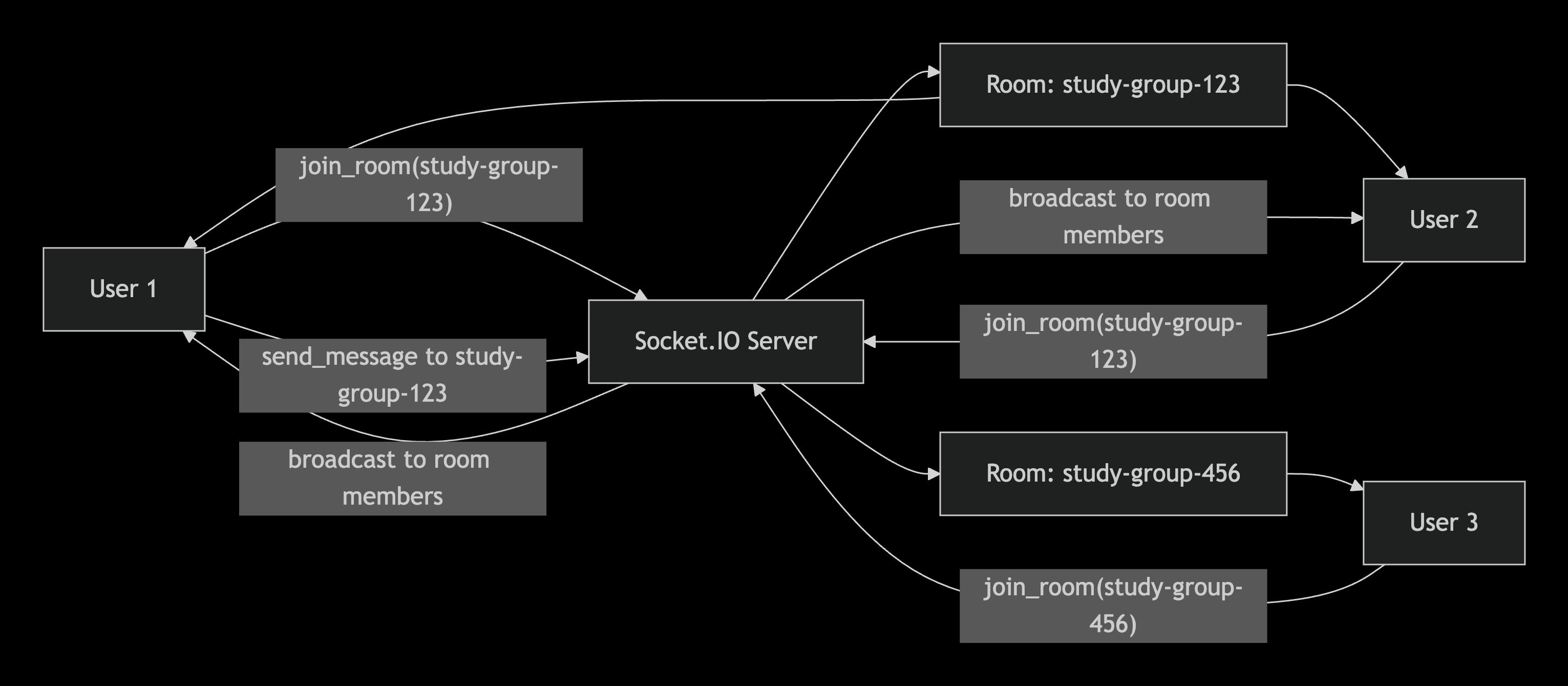
The io.to(data.roomId).emit("send_message", data) broadcast pattern ensures messages reach all room participants while maintaining room isolation.
User Connection Management
The code implements a connection tracking system using a Map that stores user IDs and their associated socket IDs.
const userSocketMap = new Map() //Need to improve more using redis

// In connection handler
if (!userSocketMap.has(userId)) {
    userSocketMap.set(userId, new Set())
}
userSocketMap.get(userId).add(socket.id)

// In disconnect handler
socket.on("disconnect", () => {
    const sockets = userSocketMap.get(userId)
    if (sockets) {
        sockets.delete(socket.id)
        if (sockets.size === 0) userSocketMap.delete(userId)
    }
})
Why This Pattern Matters
The Map with Set pattern handles multiple connections per user, which happens when:
A user opens the app in multiple browser tabs
A user connects from both mobile and desktop
Network reconnections create new socket IDs
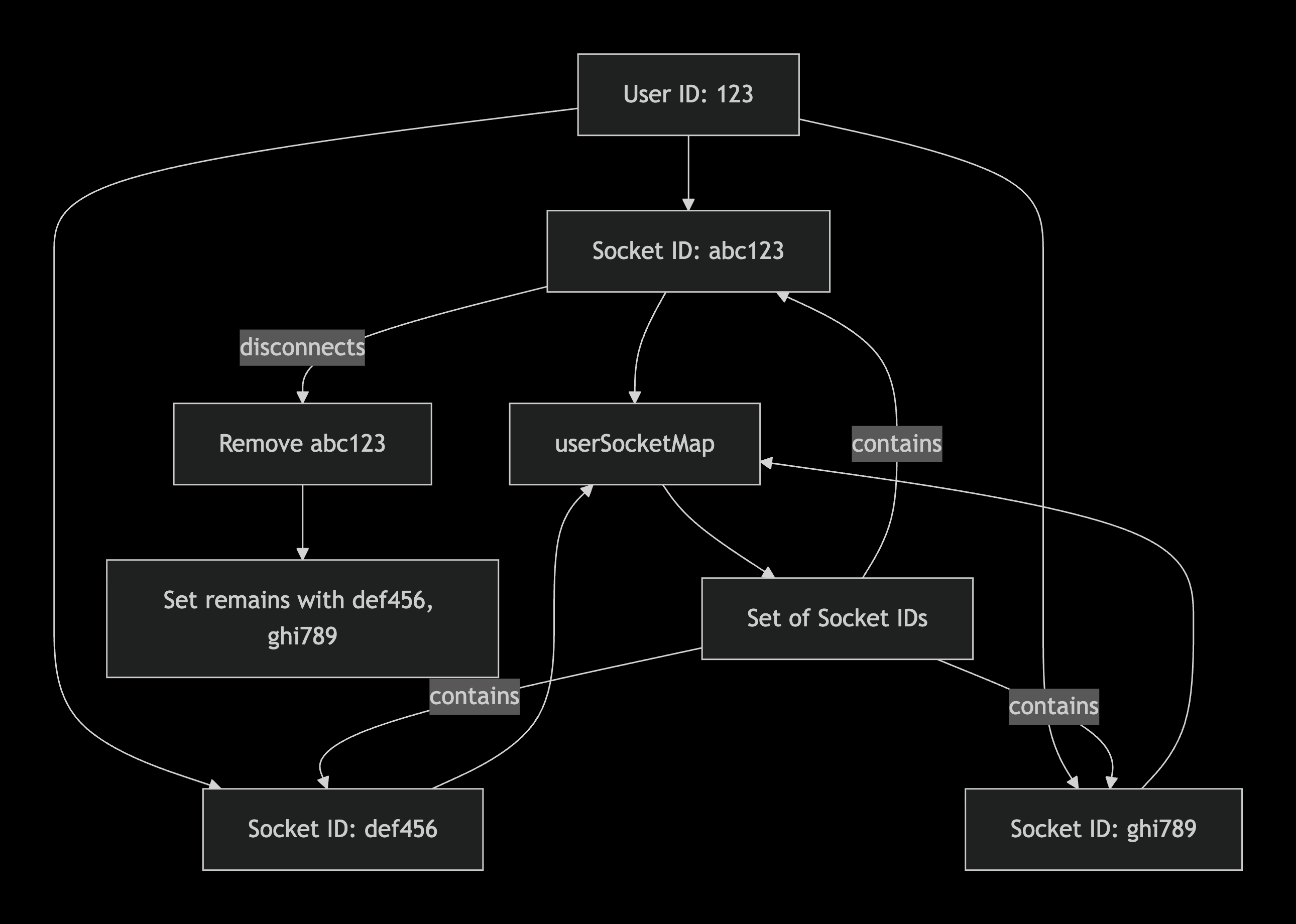
Trade-off: The code uses an in-memory Map, which means connection data is lost if the server restarts. For production, you might want to use Redis as mentioned in the comment. However, for many applications, in-memory tracking with automatic cleanup on disconnect works well enough.
Integration with Queue Events
A key feature of this implementation is the integration with background job queues through the aiQueueEvents function.
import { aiQueueEvents } from "./services/queueEvents.js"

const io = initSocket(server)
aiQueueEvents(userSocketMap, io)
This integration pattern is typical in applications that process AI tasks, image generation, or any long-running operations. Here's the flow:

The aiQueueEvents function (implementation not shown in provided excerpt) likely:
Listens for job progress events from BullMQ
Uses the
userSocketMapto find active connections for specific usersEmits real-time progress updates to connected clients
This pattern is powerful because users get immediate feedback on long-running operations without blocking the main thread.
Graceful Shutdown Implementation
The code implements comprehensive graceful shutdown handling that's critical for production environments.
const shutdown = async (signal) => {
    logger.info(`${signal} received, shutting down gracefully...`)

    io.close(() => logger.info(`Socket.io closed`))
    await shutdownRedis()
    await closeAIResponseQueue()
    await disconnectPrisma()
    httpServer?.close(() => {
        logger.info("HTTP server closed")
        process.exit(0)
    })
    setTimeout(() => process.exit(1), 10000)
}

process.on("SIGTERM", () => shutdown("SIGTERM"))
process.on("SIGINT", () => shutdown("SIGINT"))
Why Graceful Shutdown Matters
Without graceful shutdown, connections are abruptly terminated, leading to:
Lost messages and incomplete operations
Database connections left open
Queue jobs left in processing state
Poor user experience during deployments
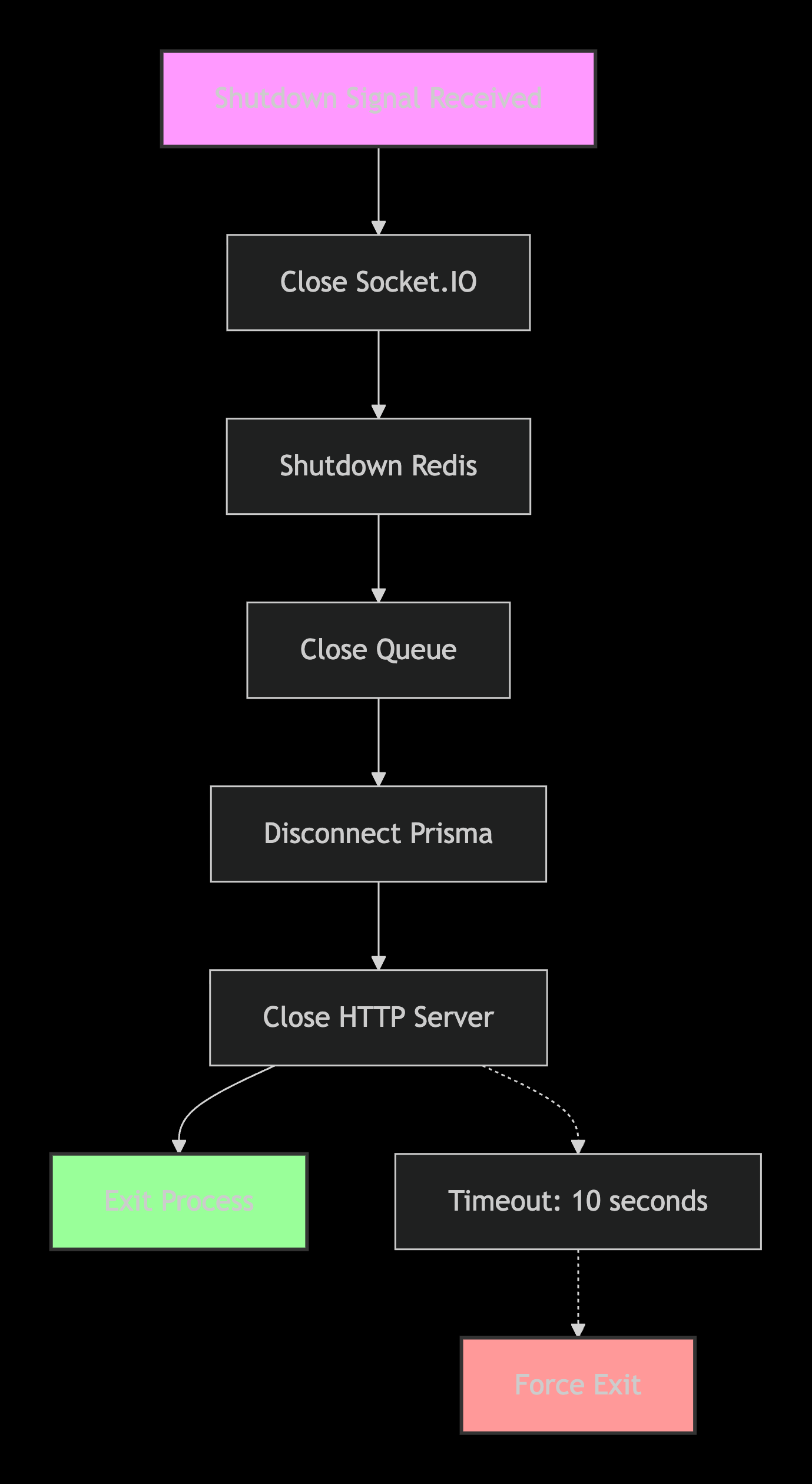
Important: The 10-second timeout ensures the process exits even if cleanup hangs, preventing stuck shutdowns that can cause deployment issues.
Database Connections and Seeding
The server initializes database connections and seeds initial data before starting.
connectDB()
    .then(async () => {
        await seedPlansData()
        httpServer = server.listen(PORT, '0.0.0.0', () => {
            logger.info(`Server is running at ${PORT}`);
        })
    })
    .catch((error) => {
        logger.error("MONGO db connection failed !!! ", error);
    })
This pattern ensures:
Database Connection: MongoDB connection established before accepting traffic
Data Seeding: Payment plans seeded if they don't exist
Clean Startup: Server only starts when dependencies are ready
The Data Seeding Flow
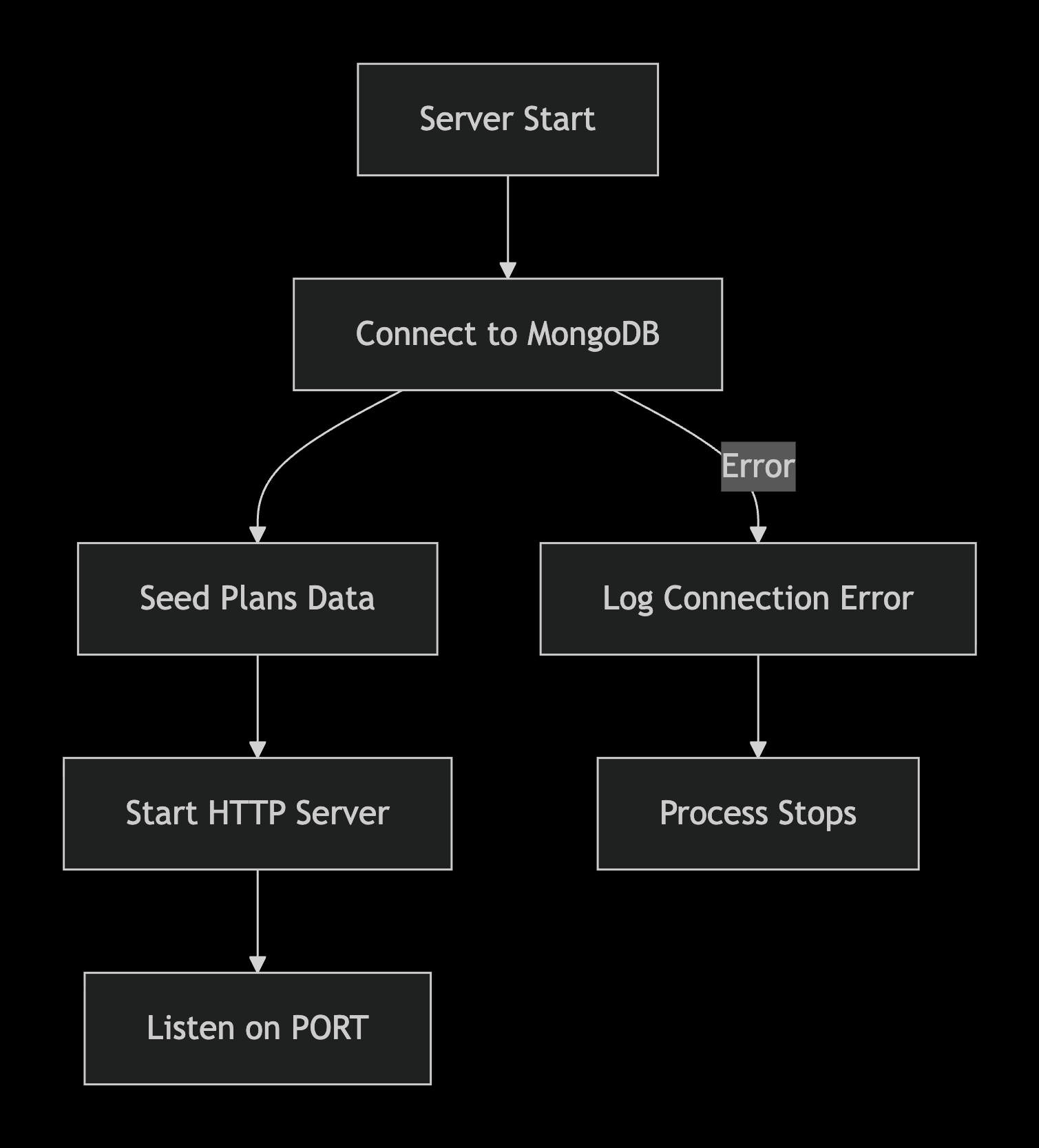
The seedPlansData() function (implementation not shown) likely checks for existing payment plans and inserts default plans if none exist. This ensures the payment system works out of the box.
Common Pitfalls to Avoid
1. Socket Connection Authentication
Problem: Many developers try to authenticate during the connection event, leading to wasted resources on unauthorized connections.
Solution: Use io.use() middleware as shown in the code.
2. Connection Tracking
Problem: Tracking only one socket per user, breaking multi-tab or device support.
Solution: Use the Map<string, Set<string>> pattern to support multiple connections per user.
3. Room Membership Validation
Problem: Sending messages to rooms without verifying membership.
Solution: The code validates room membership using socket.rooms.has(data.roomId) before broadcasting.
4. Missing Error Handling
Problem: Unhandled promise rejections in async event handlers.
Solution: Wrap async operations in try-catch blocks and emit error events to the client.
5. Incorrect Environment Detection
if (isProd !== "production") {
    // Development logging only
}
This avoids logging sensitive connection information in production while maintaining visibility during development.
Production Considerations
Scaling the Socket.IO Server
The current implementation uses in-memory storage for connection tracking. For production scaling:
Redis Adapter: Use the Socket.IO Redis adapter for horizontal scaling
External Store: Move
userSocketMapto Redis for shared state across instancesSticky Sessions: Configure load balancers for sticky sessions or use Socket.IO's built-in scaling
Health Checks and Monitoring
For production, consider adding:
Health check endpoints that verify database connections
Metrics for active connections and rooms
Monitoring for queue job processing times
Security Considerations
The authentication implementation is solid, but add:
Token refresh mechanism for long-lived connections
Rate limiting on message events
Content validation for message payloads
You might also like
This implementation is part of the StudeQ platform, a comprehensive education solution. Check out my other tutorials on:
Building AI-powered education platforms
Implementing payment systems with Razorpay
Creating real-time collaboration features
Follow me for more developer content:
Twitter/X: @KanchanNathDev - Daily developer tips and framework insights
LinkedIn: Kanchan Nath - Professional network and detailed articles
Instagram: @kanchannath.webdev - Visual coding content
Hashnode: kanchannath.hashnode.dev - In-depth technical articles
GitHub: kanchan-nath - Open source contributions
StudeQ Repository: github.com/kanchan-nath/StudeQ - Full project source
The one thing you should implement today: Add the io.use() authentication middleware to any Socket.IO project requiring user authentication. It's a small change that significantly improves security and prevents wasting resources on unauthorized connections. See this pattern live in production at StudeQ.